
As enterprise development teams scale, coordinating deployments across multiple teams, applications, and environments becomes one of the most time-consuming parts of the delivery lifecycle. Today, we're excited to introduce Releases—a new capability in Appian that brings native release management to the platform, helping teams deploy faster and with fewer surprises.

The problem: Deployment coordination shouldn't be this hard
If you've ever managed a deployment for a large Appian project, this will sound familiar. You capture requirements in a project management tool and need traceability between those tickets and changes made in Appian. So your team maintains a spreadsheet to associate objects to tickets, and when it's time to build a release, someone has to do manual analysis—checking that tickets are ready to be deployed and that all the objects associated with those tickets haven't been changed by in-flight work from another team.
And the problem compounds across environments. When it's time to move work from Test to Production, there's no way to carry that release organization forward. Someone has to manually recreate packages in each intermediate environment, re-verifying dependencies and hoping nothing was missed along the way.
Organizations told us they spend hours per deployment cycle on this manual coordination. Some create entire applications just to represent a release in their Test environment—a workaround that dilutes the meaning of applications and creates confusion across the pipeline.
We built Releases to change that.
Who is this for?
Releases is designed for teams who have outgrown manual deployment coordination:
Multi-developer teams sharing a development environment, where changes from one developer can affect another's release
Organizations with multi-stage pipelines (Dev → Test → UAT → Production) who need release organization to carry forward across environments
Release managers coordinating deployments per sprint, program increment (PI), or quarter across multiple applications
Teams currently using spreadsheets or custom tracking applications to associate objects, tickets, and releases
If your deployment process involves manual analysis to determine what's safe to deploy, Releases automates that effort with platform-native tooling.
What are Releases?
Releases are lightweight labels that you assign to packages to group related work for a deployment cycle. You create a release to represent a quarterly delivery, a feature milestone, or a program increment, and then tag your packages with it as you work.
This simple concept unlocks powerful capabilities across the entire deployment lifecycle.

See everything in one place
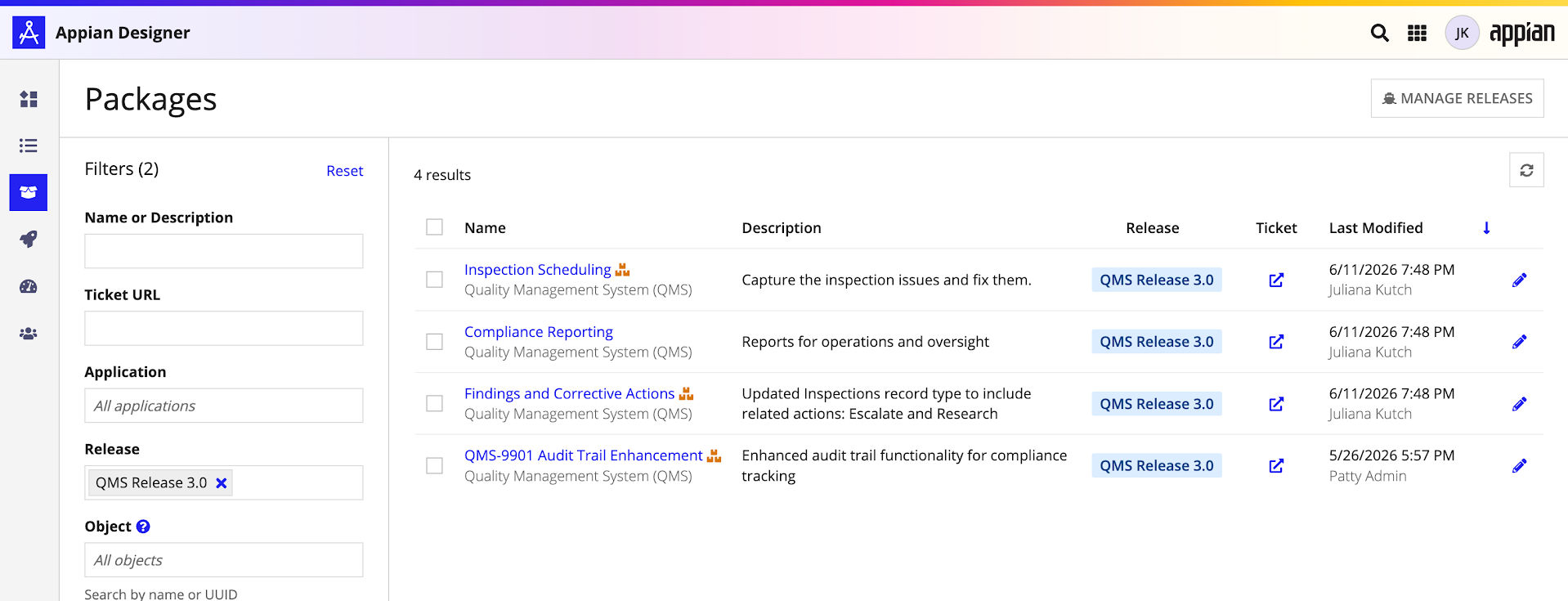
The new Packages view gives developers and release managers a single, environment-level view of every package across all applications. No more clicking into individual apps to find what you need.
From this view, you can filter packages by release, application, name, last modified date, or even by a specific object. Need to verify that all 65 tickets in your release have corresponding packages? Filter by your release and check the row count. Need to find which packages contain a specific object that's causing a bug? Use the object filter and instantly see the answer.
In usability testing, developers described this view as "super awesome"—a significant improvement over the previous experience of navigating between applications to manage packages.
Catch conflicts before they introduce bugs
When multiple teams work in the same environment, objects inevitably end up in packages across different releases. Previously, you wouldn't discover this until a deployment failed or unexpected behavior appeared in testing.
Releases introduce proactive overlap alerts. In the Packages view, an icon appears next to any package name when it contains objects that also belong to packages in a different active release. Open the package to see exactly which objects overlap and investigate further—review the changes, identify the other package owners, and determine whether it's safe to proceed with deployment.
This gives developers the information they need to coordinate before deploying, not after. If another developer's in-progress changes aren't safe to include in your release, you can revert the object to a previous version for a clean deployment. The other developer can then restore their version afterward, preserving both timelines without lost work.
As one developer put it during usability testing: "This would definitely help prevent some mistakes. A lot of the time we just rely on regression testing, and that's when we find things aren't working as expected.” In their view, the new approach would help teams get ahead of issues rather than discovering them later through testing.

Releases travel with your deployments
When you deploy packages associated with a release—whether through Compare & Deploy, manual export, or the Deployment API—the release metadata travels with the deployment automatically.
On the target environment, you can:
- See releases on the Deployment History grid. Both incoming and outgoing tabs show which releases were part of each deployment.
- Filter deployments by release. Instantly find all deployments related to a specific release.
This creates a complete audit trail: at any point, a release manager can filter the deployment history by a release and see every deployment that contributed to it. No more cross-referencing spreadsheets or change request systems to understand what was deployed, when, and by whom.
Automatically organize work on intermediate environments
This is the capability our customers asked for most: when you deploy packages with releases to an intermediate environment, Appian can automatically create release-scoped packages on the target.
To use the feature, an administrator enables it with a single toggle in the Admin console. From that point on, every deployment that contains packages with releases will automatically create one package per application per release on the target environment. If a package for that combination already exists, the new objects are added to it.
If your release spans multiple applications—say, your business application and your shared component application—you'll see two packages on UAT, one for each. Everything is organized and ready to promote to Production, with no manual recreation or sorting by last modified date.
The same overlap alerts that work on Dev also work on intermediate environments when this feature is enabled, giving release managers visibility into potential conflicts at every stage of the pipeline.
Manage the release lifecycle
Releases have a simple lifecycle: Active and Inactive.
While a release is active, it appears in dropdowns, generates overlap alerts, and helps organize your work. When the release is complete—deployed to production and verified—mark it as inactive. This filters it out of the default views, stops generating alerts for it, and optionally lets you bulk-delete the associated packages to keep your environment clean.
The per-application package limit has been increased from 100 to 500, giving teams room to track a full release cycle without hitting previous limits.
Getting started
Releases are available starting in Appian 26.4, with deployment integration and intermediate environment support coming in 26.6. To get started:
- Navigate to the Packages view in your environment.
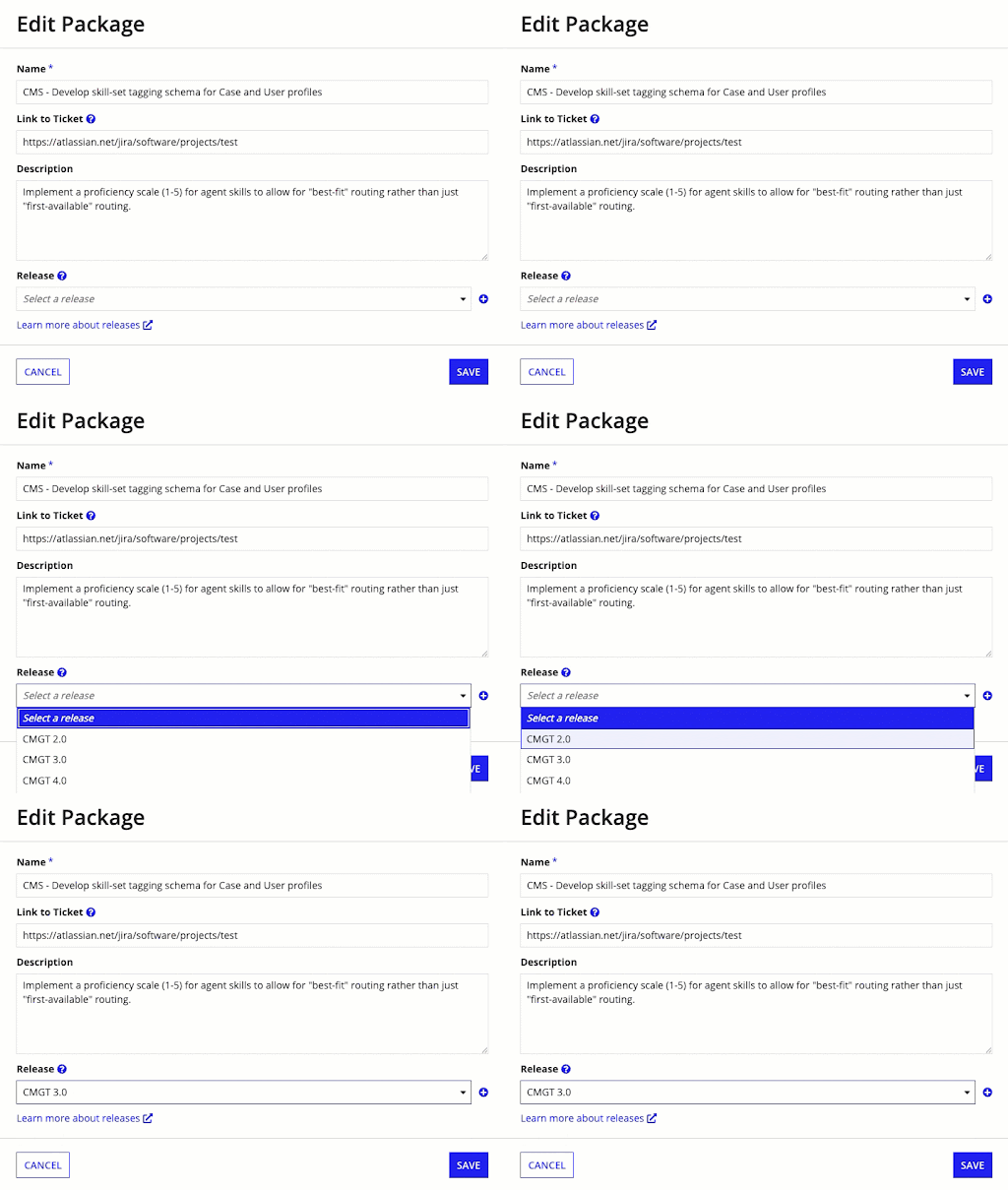
- Click Manage Releases to create your first release.
- Tag your packages with the release as you work.
- Use the Release filter to find, review, and deploy your packages together.
For intermediate environment support, enable the "Create release package on deployment" toggle in the Admin console on your target environments.
Releases represent the first step in Appian's broader investment in concurrent development capabilities. By moving deployment coordination into the platform—replacing spreadsheets, manual processes, and workarounds—we're helping development teams focus on building great applications instead of managing the complexity of getting them to production.
Read the documentation to learn more about working with Releases and watch the recording where we present the latest Appian capabilities.
